Puck Smash
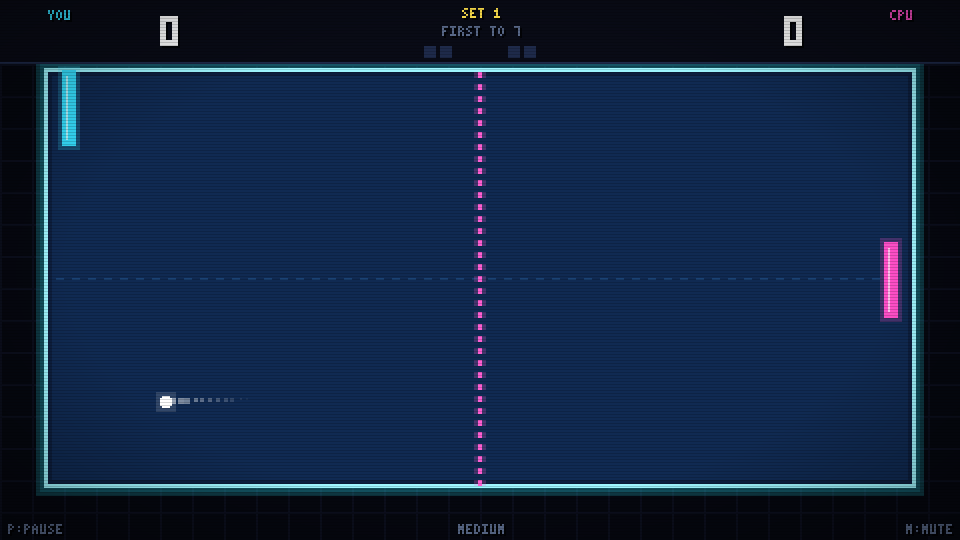
Neon air hockey where mallet speed drives the puck. Climb a ladder of six rivals, first to 7 goals each, with bank shot and smash bonuses, or play a friend on one device.
How to play
- P1 Arrows/WASD or mouse drag
- P2 I J K L
- Enter start
- P pause
- M mute
- Controller: Left stick or D-pad to move your mallet, A to confirm, B to go back, Start to pause, View to mute; in 2 Players a second controller plays player 2.
- Enter, tap or Start on a controller to start · M to mute
Touch controls appear automatically on phones and tablets. A game controller (Xbox, PlayStation or Switch Pro, wired or paired over Bluetooth) works too, on a computer or a phone. Your best score is saved in this browser and only reaches a leaderboard if you submit it (privacy). Press the fullscreen button for the full cabinet effect.
About this game
Puck Smash is neon air hockey with real momentum: the speed of your mallet goes straight into the puck, so a lazy nudge drifts and a full swing leaves a white-hot trail. Climb a ladder of six rivals, each with a face and a habit of their own, or hand a friend the other half of the screen.
Goal: Knock the puck into the goal on the far side and be first to seven. In Solo Ladder you face six rivals in a row, and one lost match ends the run with the score you have banked so far.
Puck Smash is an original air hockey game built for the browser in the style of 1980s arcade cabinets: pixel art, a chiptune soundtrack and CRT scanlines, all generated in code. It is free, has no ads and needs no download or account.
What’s inside
- Solo Ladder: Moss the sleeper, Granite Gus the wall, Volt Vee the rusher, Carom Kit the angle artist, Miss Fib the faker and Nil, the last rung
- 2 Players: one device, one mallet each, first to seven; this mode does not touch the high score
- Goals are worth more on each rung, with extra points for bank shots, smashes and the size of your win
- A large bonus for clearing all six rivals
- Players
- 1 player against the CPU, or 2 players on one device.
- On a phone
- Drag your mallet with one finger. In 2 Players each player owns their half of the screen, and both can play at once. Tap the Pause label at the top to pause. It plays best held sideways; held upright the table scales to fit, and in fullscreen a thumb on the space below the table steers the mallet like a trackpad.
- With a controller
- Left stick or D-pad to move your mallet, A to confirm, B to go back, Start to pause, View to mute; in 2 Players a second controller plays player 2.
- Round length
- A match usually takes one to two minutes, so a full climb of the ladder is about ten minutes. A loss restarts the climb.
Tips
- A goal that touched the top or bottom rail after your last hit pays a bank shot bonus, and it is the way past Granite Gus, who only reads straight lines.
- Swing through the puck instead of pushing it: a very fast hit that goes in pays a smash bonus, and the harder the shot, the worse your rival reads it.
- You have seven seconds on your side of the centre line. Hold the puck longer and it is handed to the other player.
Questions
How is the Puck Smash score worked out?
Only your goals in Solo Ladder score. Each goal pays 100 points times the rival's rung, a bank shot adds 150 times the rung and a smash adds 200 times the rung. Winning a match adds 100 times your winning margin times the rung, and beating all six rivals adds 5,000.
What happens if the puck gets stuck?
A puck that sits still in a corner, idles after a hit or stays jammed in one spot is reset and goes to the other side. A puck held in one half for seven seconds is handed over as well, with a warning first.
What are the keyboard controls for two players?
Player 1 uses the arrow keys or WASD and player 2 uses I, J, K and L. A mouse can also drag a mallet: the left half moves player 1 and the right half moves player 2.
Leaderboards Today’s challenge
Today
- Loading…
This week
- Loading…
All time
- Loading…
Scores are highest first. Your best is read from this browser when you submit; three initials, arcade style. Days and weeks run on UTC: the weekly board starts again every Monday at 00:00 UTC.